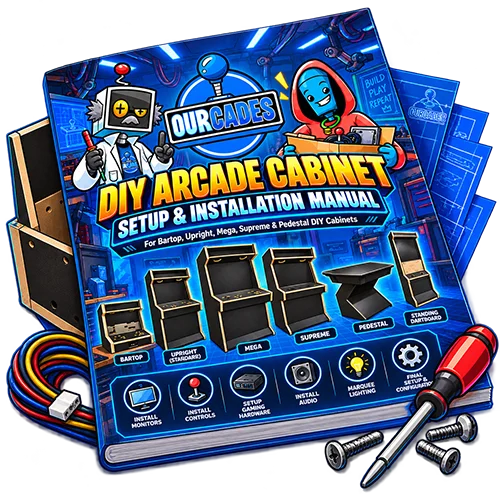
DIY Cabinet Customization Details
Cabinet Details
About Our DIY Cabinets
Build your own arcade with a professionally constructed Ourcade DIY arcade cabinet! Explore our cabinet models, monitor compatibility, control panel layouts, artwork options, and included features before placing your order.
Our DIY arcade cabinets provide the foundation for your custom gaming setup while allowing you to select and install your own monitor, gaming system, arcade controls, audio equipment, and accessories.
Browse the information below to learn what is included, what you’ll need to supply, and how to customize your arcade cabinet to fit your project.
Do DIY Cabinets Arrive Assembled?
Yes! Every Ourcade DIY arcade cabinet arrives fully assembled.
The main cabinet structure is professionally constructed before shipping. You do not need to assemble individual cabinet panels or build the cabinet from scratch.
Some finishing components, including the screen plexiglass, screen ABS, and marquee plexiglass, are supplied separately for installation during your build.
Depending on your selected configuration, you may also need to install your monitor, arcade buttons, joysticks, gaming system, speakers, lighting, and other electronics.
Our DIY cabinets are designed to eliminate the woodworking involved in constructing an arcade cabinet while still giving you the freedom to create your own gaming setup.
What Is Included With a DIY Cabinet?
Every Ourcade DIY cabinet includes the professionally assembled cabinet structure and the applicable cabinet finishing components.
Standard cabinet features include:
- Fully assembled black melamine cabinet construction.
- Solid cabinet bottom for installing your electronics.
- Factory-prepared control panel and removable control panel box.
- Preinstalled adjustable VESA monitor mount on applicable models.
- Clear screen plexiglass and textured ABS screen surround on applicable models.
- Factory-prepared rear power switch opening.
- Cabinet access panels for reaching the interior.
- Included cabinet installation hardware.
Bartop and upright models also include the applicable marquee plexiglass and retaining strips, along with factory-prepared speaker openings.
Important: DIY cabinets do not include a monitor, gaming system, arcade controls, speakers, electrical components, or other customer-installed electronics unless specifically identified as part of your selected order.
Optional components and customization features depend on the selections made when ordering.
What Do I Need to Purchase Separately?
Our DIY cabinets are intended for customers who want to select and install their own gaming hardware.
Depending on your build, you may need to supply:
- Compatible monitor or external display.
- Raspberry Pi, gaming PC, or another gaming system.
- Arcade buttons, joysticks, and control encoders.
- Control wiring, connectors, and USB cables.
- Speakers, audio amplifier, and audio wiring.
- Marquee lighting and its power supply.
- Combination power inlet and rocker switch.
- Internal surge protector or power strip.
- HDMI or DisplayPort cables.
- Monitor-compatible VESA mounting screws.
- Cable management accessories.
- Ventilation fans or vents.
- Additional mounting hardware for your electronics.
Your exact requirements will depend on your cabinet model, gaming system, control panel configuration, and selected options.
Ourcade supplies the cabinet foundation. Customers are responsible for selecting compatible electronics and completing their custom gaming setup.
Monitor & Display
Which Monitor Sizes Are Compatible?
Our DIY arcade cabinets support different monitor sizes depending on the cabinet model.
Recommended monitor size ranges:
- Bartop: 19–24 inches
- Standard models: 19–24 inches
- Mega models: 24–32 inches
- Supreme models: 40–43 inches
Our cabinets use an adjustable VESA mounting system that allows customers to position their monitor during installation.
All standard DIY cabinet monitor configurations are designed for horizontal (landscape) orientation only.
Monitor dimensions, bezel sizes, and mounting patterns can vary between manufacturers. Customers should verify that their chosen monitor fits the cabinet before purchasing.
Pedestal arcade cabinets are designed for use with an external display rather than an integrated cabinet monitor.
Is a Monitor Mount Included?
Yes! DIY cabinets designed for an integrated monitor include a preinstalled adjustable VESA mounting system.
Supported VESA mounting patterns:
- 75 × 75 mm
- 100 × 100 mm
- 200 × 200 mm
The mounting system supports vertical, horizontal, and depth adjustments, allowing you to properly position your monitor inside the cabinet.
The monitor’s tilt angle is fixed by the cabinet design and is not independently adjustable.
The VESA mounting plate can also be removed when attaching your monitor, then reinstalled using the existing bracket hardware.
Monitor mounting screws are not included. Customers must supply screws compatible with their specific monitor.
Monitor compatibility should be verified before ordering.
What Are the Screen Plexiglass and ABS Materials?
Our DIY cabinets with integrated monitor openings include materials for creating a clean, finished screen surround.
Clear Screen Plexiglass
- 1/8-inch clear plexiglass.
- Factory-cut to fit the cabinet.
- Predrilled mounting holes.
- Protective paper on both sides.
- Four mounting screws included.
Textured ABS Screen Surround
- 1/16-inch textured ABS plastic.
- Supplied without protective covering.
- Customer-cut to fit the selected monitor.
- Textured side faces outward.
Because monitors have different screen dimensions and bezel sizes, the ABS is not precut for a specific display.
Customers measure and cut the ABS opening to match their monitor, allowing the material to slightly overlap the monitor bezel without covering the visible display.
The clear plexiglass installs over the ABS and holds it in place using the four included mounting screws.
Minor smoothing of the factory-cut plexiglass edges may be necessary.
Controls & Customization
Can I Customize the Control Panel Layout?
Absolutely! Our DIY arcade cabinets offer multiple control panel configurations to accommodate different gaming preferences.
Available control panel options include:
- 6-button arcade layouts.
- 8-button arcade layouts.
- Joystick mounting openings.
- Trackball cutouts.
- Spinner cutouts.
- Blank, uncut control panels.
- Custom button layouts.
Control panels are constructed from melamine-coated particleboard.
Standard button openings are designed for 30 mm arcade buttons, including action, start, coin, and auxiliary buttons. Different button hole sizes may be requested when ordering.
Your control panel will be prepared according to the configuration selected during checkout.
Please review your control panel selections carefully before ordering, as the openings are prepared specifically for your chosen configuration.
Are Arcade Buttons and Joysticks Included?
Arcade buttons, joysticks, encoders, switches, and control wiring are not included with the standard DIY cabinet.
Customers can choose their preferred arcade hardware to create a customized control setup.
Our control panels support standard screw-in arcade buttons with retaining nuts, using 30 mm button openings unless a different size is requested.
Joystick shaft openings are prepared according to the selected layout. Customers install their own joysticks from underneath the control panel and prepare the appropriate mounting screw holes for their chosen joystick hardware.
This flexibility allows you to select the buttons, joysticks, colors, and control electronics that best fit your gaming system and personal preferences.
Can I Add a Trackball or Spinner?
Yes! Trackball and spinner configurations are available when selected during ordering.
Trackball Configuration
Our standard trackball preparation is designed for the Ultimarc U-Trak 3-inch trackball. The required trackball opening and mounting holes are factory-prepared.
Spinner Configuration
Our standard spinner preparation is designed for the Ultimarc SpinTrak. The spinner shaft opening is factory-cut, while any additional mounting holes required for your spinner are prepared by the customer.
Trackballs, spinners, knobs, interface electronics, wiring, and installation hardware are customer-supplied.
If optional control panel plexiglass is selected, its openings are prepared to match the chosen control panel configuration.
Please select the appropriate specialty control openings when ordering your cabinet.
Is Control Panel Plexiglass Available?
Yes! Clear control panel plexiglass is available as an optional upgrade.
Control Panel Plexiglass Features:
- 1/8-inch clear plexiglass.
- Factory-cut to match the selected control panel.
- Predrilled or precut openings corresponding to the chosen buttons and controls.
- Smooth, finished edges.
- Supplied already installed on the control panel.
The plexiglass arrives with protective paper on its top surface. Customers remove the plexiglass temporarily to peel away the protective paper before completing their control installation.
The plexiglass is secured using the existing control panel mounting screws and installed controls rather than a separate set of dedicated plexiglass screws.
Control panel plexiglass is included only when selected during ordering.
Can I Add Custom Artwork?
Yes! Artwork options allow you to personalize your DIY arcade cabinet and create a unique arcade experience.
Artwork availability depends on the customization options selected during ordering.
Control Panel Artwork
When selected, control panel artwork is applied to the panel. Customers will need to carefully cut the artwork along the inside edges of the prepared button, joystick, and specialty control openings during installation.
Marquee Artwork
When selected, marquee artwork arrives already applied to the marquee plexiglass.
Marquee artwork is not included unless specifically selected during ordering.
Be sure to review the artwork options available for your chosen cabinet model before placing your order.
Does the Cabinet Include a Marquee?
Our bartop and upright DIY arcade cabinets include a marquee area designed to complete the classic arcade appearance.
Marquee Features:
- Clear marquee plexiglass.
- Factory-installed retaining strips.
- Preinstalled universal lighting mounting brackets.
- Access to the marquee compartment through the front opening.
- Internal cable routing into the main cabinet compartment.
The marquee plexiglass is supplied separately and arrives without protective paper or film.
Marquee artwork is included only when selected during ordering and arrives already applied to the plexiglass.
Marquee lighting is not included. Customers choose and install their preferred lighting fixture, power supply, and wiring.
Pedestal arcade cabinets do not include a marquee.
Marquee & Audio
Does the Cabinet Include a Marquee?
Our bartop and upright DIY arcade cabinets include a marquee area designed to complete the classic arcade appearance.
Marquee Features:
- Clear marquee plexiglass.
- Factory-installed retaining strips.
- Preinstalled universal lighting mounting brackets.
- Access to the marquee compartment through the front opening.
- Internal cable routing into the main cabinet compartment.
The marquee plexiglass is supplied separately and arrives without protective paper or film.
Marquee artwork is included only when selected during ordering and arrives already applied to the plexiglass.
Marquee lighting is not included. Customers choose and install their preferred lighting fixture, power supply, and wiring.
Pedestal arcade cabinets do not include a marquee.
Are Speakers or Audio Equipment Included?
Audio equipment is not included with the standard DIY arcade cabinet.
Bartop and upright models feature two factory-prepared 4-inch speaker openings, positioned underneath the marquee and facing downward.
Customers supply their preferred compatible speakers and any required audio equipment, including:
- Speakers.
- Speaker grilles.
- Audio amplifier, if required.
- Speaker wiring and connectors.
- Audio cables and power connections.
- Speaker mounting hardware.
This allows you to choose an audio system that fits your gaming setup and sound preferences.
Pedestal cabinets do not include an integrated audio system.
Electronics & Power
Can I Install My Own Gaming System?
Yes! One of the biggest advantages of an Ourcade DIY cabinet is the freedom to choose your own gaming hardware.
You can create a custom arcade using a Raspberry Pi, gaming PC, or another compatible gaming system.
The cabinet features a solid bottom panel that provides space for installing customer-selected electronics. The interior is finished in black melamine.
Customers are responsible for selecting compatible hardware, securing their electronics, and completing the required power, video, audio, and control connections.
The cabinet does not include a preinstalled gaming system, operating system, games, or control electronics as part of the standard DIY configuration.
Your gaming experience is determined by the hardware and software you choose to install.
How Do I Access the Inside of the Cabinet?
Our DIY arcade cabinets are designed to provide access to the interior for installing your gaming electronics and controls.
Bartop and Upright Cabinets
These models feature a removable rear access panel secured with screws.
Pedestal Cabinets
Pedestal models feature a hinged lower front access panel that swings open. This panel is free-floating and does not use a latch, magnet, or retaining screws to keep it closed.
Control Panel Access
The control panel top can be removed by taking out its mounting screws. The control panel box can also be removed by accessing six mounting screws located inside the box.
The control panel box has a solid bottom suitable for mounting control encoders and an open rear section that allows wiring to pass into the main cabinet interior.
These access features make it easier to install and connect your selected hardware.
Does the Cabinet Include a Power Switch?
Our DIY cabinets include a factory-prepared opening on the rear of the cabinet for installing a combination power inlet and illuminated rocker switch.
The opening is designed for a compatible switch module, such as the 3Dman Rocker Switch Socket Module.
Please note:
- The power switch is not included.
- Electrical wiring is not included.
- Switch mounting screws are customer-supplied.
- Customers are responsible for installing and connecting their electrical components.
We recommend using a properly rated internal surge protector or power strip, securely mounted to an interior side wall using its mounting holes and suitable screws.
Electrical installation and wiring are the customer’s responsibility. Mains-voltage connections should be completed by a qualified electrician.
Our DIY cabinet documentation identifies the factory power switch opening but does not provide mains electrical wiring instructions.
Does the Cabinet Have Ventilation?
Our DIY arcade cabinets do not include factory-cut ventilation openings or preinstalled cooling fans.
Because different gaming systems produce different amounts of heat, we recommend providing adequate ventilation for all enclosed gaming electronics.
Customers are responsible for selecting and installing appropriate fans, vents, and cooling components.
Ventilation placement, fan size, power method, and airflow requirements depend on the electronics installed.
Customers may also choose to add dust filters, although these are optional.
When planning your build, allow for cool-air intake, warm-air exhaust, and adequate clearance around heat-producing components.
This flexibility lets you design a cooling solution suited to your particular gaming system.
What Tools Will I Need?
Our DIY cabinets arrive assembled, so you won’t need the extensive woodworking tools typically required to build an arcade cabinet from scratch.
Basic tools needed include:
- Phillips screwdriver.
- Power drill or electric screwdriver.
- Appropriate drill bits.
- Utility knife.
- Measuring tape or ruler for fitting the screen ABS.
Depending on your electronics, controls, and optional upgrades, additional tools may be required.
For example, installing ventilation openings or custom hardware may require additional cutting or drilling equipment.
The exact tools needed will depend on your selected configuration.
Delivery & Ownership
How Are DIY Cabinets Shipped?
Our DIY arcade cabinets are shipped fully assembled using freight delivery.
Each cabinet is secured to a pallet and protected inside a wooden shipping crate to help safeguard it during transportation.
Shipping Details:
- Fully assembled cabinet.
- Palletized freight shipment.
- Protective wooden shipping crate.
- Curbside delivery.
- Liftgate service.
Freight delivery does not include carrying the cabinet into your home, moving it upstairs, unpacking it, or installing your electronics.
We recommend having at least two people available to receive and move the cabinet, along with appropriate moving equipment.
Customers should inspect the shipment upon arrival and report any visible shipping damage according to our shipping and delivery policy.
Can I Move the Cabinet Easily?
Our DIY arcade cabinets are constructed as fully assembled furniture-style arcade enclosures.
The cabinets do not include wheels, casters, leveling feet, or other mobility hardware as standard equipment.
We recommend placing your cabinet on a stable, level surface.
Because the cabinets are fully assembled, their size and weight should be considered when planning delivery, moving them through doorways, and positioning them in your gaming space.
For upright cabinets, we recommend using appropriate customer-supplied anti-tip wall anchoring hardware for added stability.
Please plan your installation location before delivery.
Ordering Decisions
What Makes the Pedestal DIY Cabinet Different?
Our DIY pedestal arcade cabinets are designed for customers who want a standalone arcade control station that connects to an external display.
Unlike our bartop and upright cabinets, pedestal models do not include an integrated monitor area, marquee, or audio system.
Pedestal-Specific Features:
- Fully assembled pedestal cabinet.
- Customizable arcade control panel.
- Interior space for customer-installed electronics.
- Hinged lower front access panel.
- HDMI passthrough and HDMI cable provision for connecting to an external display.
Customers supply their own external monitor or television, gaming hardware, controls, audio equipment, and applicable wiring.
A pedestal setup is ideal for customers who prefer playing on an existing television or a separately mounted display.
Can I Customize My DIY Cabinet Before Ordering?
Yes! Ourcade DIY arcade cabinets offer several customization options so you can prepare the cabinet for your planned gaming setup.
Depending on the selected model, available options may include:
- Different arcade control panel layouts.
- 6-button or 8-button configurations.
- Custom control panel layouts.
- Trackball and spinner cutouts.
- Blank or uncut control panels.
- Control panel plexiglass.
- Control panel artwork.
- Marquee artwork.
- Available cabinet finishing and T-molding color selections.
Not every option applies to every cabinet model.
Because control panel openings and selected features are prepared during production, please review your customization selections carefully before placing your order.
If you have a specific hardware layout in mind, confirm compatibility before ordering.
Is a DIY Arcade Cabinet Right for Me?
An Ourcade DIY Arcade Cabinet is a great choice for arcade enthusiasts who enjoy selecting their own hardware and building a personalized gaming experience.
A DIY cabinet may be right for you if:
- You already own a Raspberry Pi, gaming PC, or other compatible gaming system.
- You want to choose your own buttons, joysticks, and control electronics.
- You enjoy installing and configuring gaming hardware.
- You want a professionally assembled cabinet without doing the woodworking yourself.
- You prefer customizing your arcade setup around your own equipment and preferences.
Keep in mind: Our DIY cabinets are not ready-to-play arcade machines.
Customers must provide and install the required electronics, controls, wiring, and other components needed to make their arcade operational.
If you prefer a complete arcade that’s ready to enjoy, explore our fully built arcade options instead.